LEVEL 1
Pen name
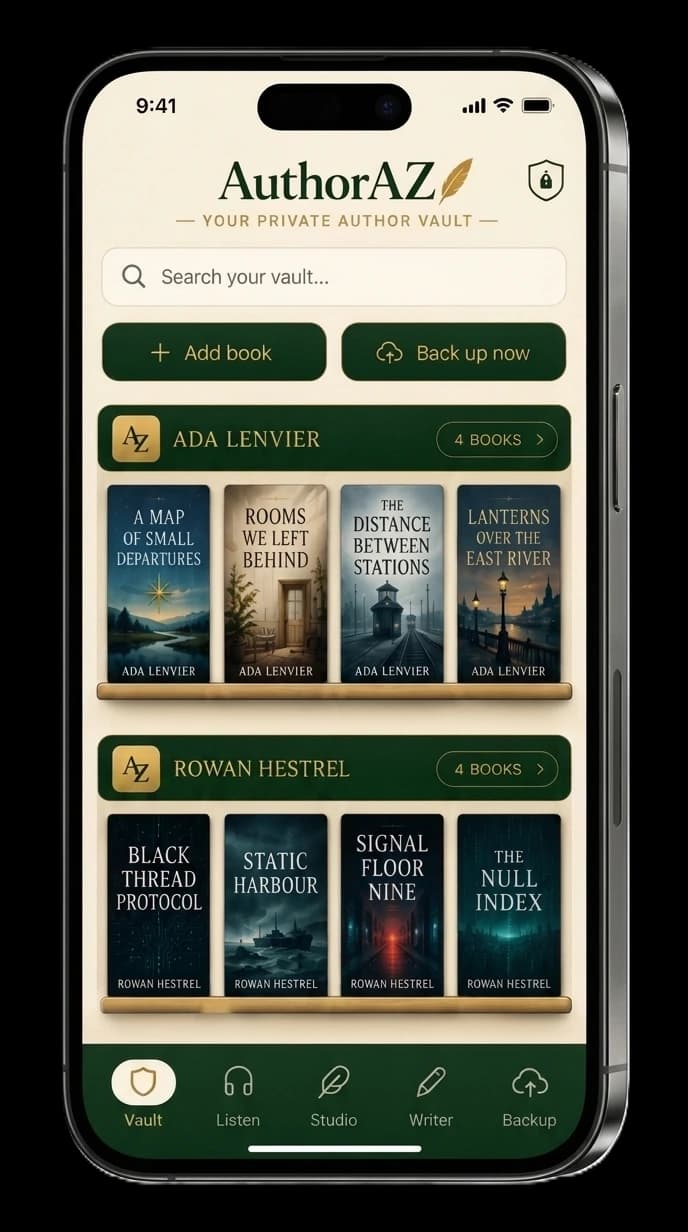
Each pen name is its own shelf, so the books, branding and links for one name never mix with another.
Local-First Mobile Writing Vault · iOS & Android
Draft chapters, dictate with your device’s own on-device speech recognition, and keep every blurb, keyword, cover, buy link, and quote in the same encrypted vault. In the mobile app: no cloud account, no AI, no in-app tracking.
Version 2 adds the Writer, dictation, and dark mode

14-day free trial · Lifetime unlock: US $29.99 (US App Store)
One-time purchase. No subscription. Installing is free; the unlock is an optional in-app purchase after the trial.
USD 29.99 · lifetime unlock, United States App Store
Apple App Store prices vary by country or region and may change. The price shown in your App Store at checkout is final. Figures are from the AuthorAZ App Store Connect price export; outside the US, Apple adjusts them automatically.
On Android, check your local price in Google Play.
Your library lives on your device, not on AuthorAZ servers.
Your drafts and manuscripts are written, searched, and scanned locally. Nothing is sent to a model.
The mobile app is built without analytics, ads, or behavior profiles.
Export a password-protected file you store wherever you choose.
Inside AuthorAZ
Writing, dictation, books, manuscript reference, listening, and author-facing social assets all stay in the same offline app — in light or dark.
Click any screen to inspect full size
Video walkthrough
A three-part walkthrough of the app on a real device.
Plays from YouTube in privacy-enhanced mode. Nothing loads from YouTube until you press play.
Book projects
AuthorAZ organizes the writing and publishing side of a book project on your device: pen names, the books under each one, and everything a book needs on its way to readers. It is not a plotting, timeline or worldbuilding tool; if that is the job, a dedicated outliner will serve you better.
Each pen name is its own shelf, so the books, branding and links for one name never mix with another.
Every book records its series name and number, status (draft, in production or published), release date and notes.
Chapters with history, an imported manuscript snapshot, covers, blurbs, KDP metadata, buy links, quotes and reviews.
Each book shows which essentials are still missing, and tapping one takes you to where it is added.
8 Local Modules · 1 Encrypted Database
AuthorAZ is where the book gets written and where everything around it gets kept: the chapters, and the business details reused every launch week, newsletter, ad setup, store edit, and promo post. One encrypted vault, one device, no advice checklist attached.
Draft chapters inside the vault, with autosave rather than a save button, find and replace, chapter history you can restore from, and export to DOCX, TXT, Markdown, or a plain .zip of text files.
Dictate straight into a chapter using your device’s own on-device speech recognition. If your device or language cannot do it locally, dictation refuses to start rather than falling back to a server.
Keep covers, blurbs, KDP metadata, ISBNs, pricing, page counts, A+ notes, and buy links together per title, across pen names.
Import a read-only text snapshot of work drafted elsewhere, search it, scan for quote candidates, listen locally, and check basic health stats.
Use literal search across imported manuscripts and on-device text-to-speech for proofreading by ear.
Make Quote Cards, Review Cards, and Custom Carousels from your own words—with your own colors and branding. No AI, no cloud, no upload.
Copy a keyword, blurb, ASIN, link, or full metadata sheet straight into KDP, an ad, or a post.
Write, listen, browse, and back up in a dark interface. Follow your device, or pin it to light or dark because you said so.
Keeps every reusable business field for a title under its pen name: subtitle, series number, short and long blurbs, 7 KDP keyword slots, 3 BISAC/store categories, ISBNs, ASIN, print trim/page count, and direct retailer buy links.
Local Schema & Runtime Invariants
New in version 2
The Writer keeps chapters, revisions, and snapshots inside the same encrypted vault as the metadata, covers, and quotes. Nothing to sync, nothing to reconcile, and no second app holding half the book.
Chapters that autosave as you type. No save button, and a chapter history that survives a restart.
Dictation that runs on the device or not at all — there is no online fallback to quietly fall back to.
Dark mode across writing, listening, browsing, and backup, following your device or pinned where you want it.
Export a chapter or the whole manuscript to DOCX, TXT, Markdown, or a plain .zip of text files.


Most author business work is not glamorous. You need the right keyword, description, link, cover file, quote, or ISBN at the exact moment a platform asks for it.
Copy individual KDP keywords or a full metadata sheet.
Collect store links per book and copy them as clean blocks.
Create quote cards, review cards, and custom carousels in your own colors.
Listen locally with system voices before readers do.
Supported Targets
AuthorAZ is now available for iPhone and iPad on the App Store and for Android phones and tablets on Google Play.
Available now for the fields you reuse while publishing and promoting.
Apple App Store
Available now with more room for writing, metadata, manuscript tools, quote cards, and backups.
Apple App Store
Available now for Android phones and tablets on Google Play.
Google Play (No INTERNET perm)
AI-search visibility
AuthorAZ documents only owner-verified AI-search observations. The record keeps the original query, date, and a restrained response summary together so readers can see the context—and its limits.
ChatGPT
A web-search response surfaced AuthorAZ as a local-first mobile app for authors that keeps manuscript and book assets on the device, away from cloud storage and AI processing.
Gemini
Gemini surfaced AuthorAZ as a local-first mobile vault for indie authors, distinguishing it from a writing app and describing its on-device manuscript snapshots, metadata, pen names, and author assets.
Perplexity
Perplexity included AuthorAZ in a comparison of mobile options, identifying it as a dedicated manuscript and publishing-assets vault for authors who want a local-first workflow without AI processing, cloud dependency, or tracking.
AI-search responses vary by user, time, and product. These observations are not endorsements by the platforms named above.
In the mobile app, no cloud means nobody can leak, train on, or sell your work — the chapters you draft here included. You export an encrypted backup, store it where you choose, and restore it when you move devices.
Read how the no-AI, no-cloud architecture worksYes. Version 2 added the Writer: chapters, autosave, find and replace, chapter history you can restore from, snapshots, and export to DOCX, TXT, Markdown, or a plain .zip of text files. Manuscripts you drafted elsewhere can still come in as read-only snapshots for search, listening, and quotes.
Yes, the writing and publishing side of it. Books sit under pen names, each with its series, status and release date, and each book holds its chapters, manuscript snapshot, covers, blurbs, KDP metadata, buy links, quotes and reviews. A readiness checklist shows what a book is still missing. It is not a plotting, timeline or worldbuilding tool.
Dictation uses your device’s own built-in speech recognition and AuthorAZ explicitly asks for the on-device mode. If your device or language cannot provide it, dictation refuses to start rather than falling back to an online service. Speech recognition is part of iOS or Android, so we can tell you exactly what we ask for, but we cannot audit Apple’s or Google’s code.
No. Your drafts stay in the encrypted local database, and imported manuscripts are local read-only snapshots used for search, line scanning, listening, and quote extraction.
No. The app writes nothing for you and analyses nothing with a model. It uses deterministic local tools and templates.
Yes. Export a password-encrypted backup file and restore it on another device.
AuthorAZ is free to download, with a 14-day free trial of every feature. After the trial, an optional one-time lifetime unlock is bought in the app: US $29.99 on the US App Store. Other Apple storefronts have their own prices, which you can check by country on this page. On Android, the price is the one Google Play shows at checkout. There is no subscription.
Write it, dictate it, organize it, and make branded social content from the work already on your device. No AI, no cloud, no account.